A good social media report does more than present numbers. It should help clients, managers, and marketing teams quickly understand what happened, why it happened, and what should happen next.
That is why choosing the right social media report template matters. A well-structured PowerPoint template can turn engagement data, audience growth, campaign results, and content performance into a report that is easier to read and present.
For marketers and agencies, a professional template can also make recurring social media reporting faster and more consistent. Instead of rebuilding the presentation every month, you can update the data while keeping the overall visual structure intact.
What Should a Social Media Report Include?
Before choosing a template, it helps to understand what information the report actually needs to communicate. A typical social media marketing report may include several key areas:
- Account overview: follower growth, reach, impressions, and overall activity.
- Engagement performance: likes, comments, shares, saves, and engagement rate.
- Content performance: top-performing posts, formats, topics, and campaigns.
- Audience insights: audience demographics, locations, interests, or other available data.
- Campaign performance: results from specific campaigns or promotional activities.
- Key insights: important trends, changes, and observations from the reporting period.
- Recommendations: actions that can be taken based on the results.
The exact sections will depend on the purpose of the report. A monthly internal report may focus on KPIs and trends, while an agency client report may need more space for campaign results, content highlights, and recommendations.
Best Social Media Report PowerPoint Templates
There is no single template that works for every marketing team. The best option depends on who will read the report and what kind of information needs to be presented.
1. Social Media Performance Report Template
A performance report is useful when the primary goal is to show how social media accounts performed during a specific period.
This type of social media report template typically focuses on KPIs such as follower growth, reach, impressions, engagement, and content performance.
A good layout should make comparisons easy. For example, monthly performance can be presented alongside the previous period so readers can immediately see whether important metrics increased or decreased.
This format works particularly well for:
- Monthly social media reports
- Quarterly marketing reviews
- Internal marketing meetings
- Performance updates for management
2. Social Media Analytics Report Template
When the report contains a larger amount of data, a social media analytics format can be more appropriate.
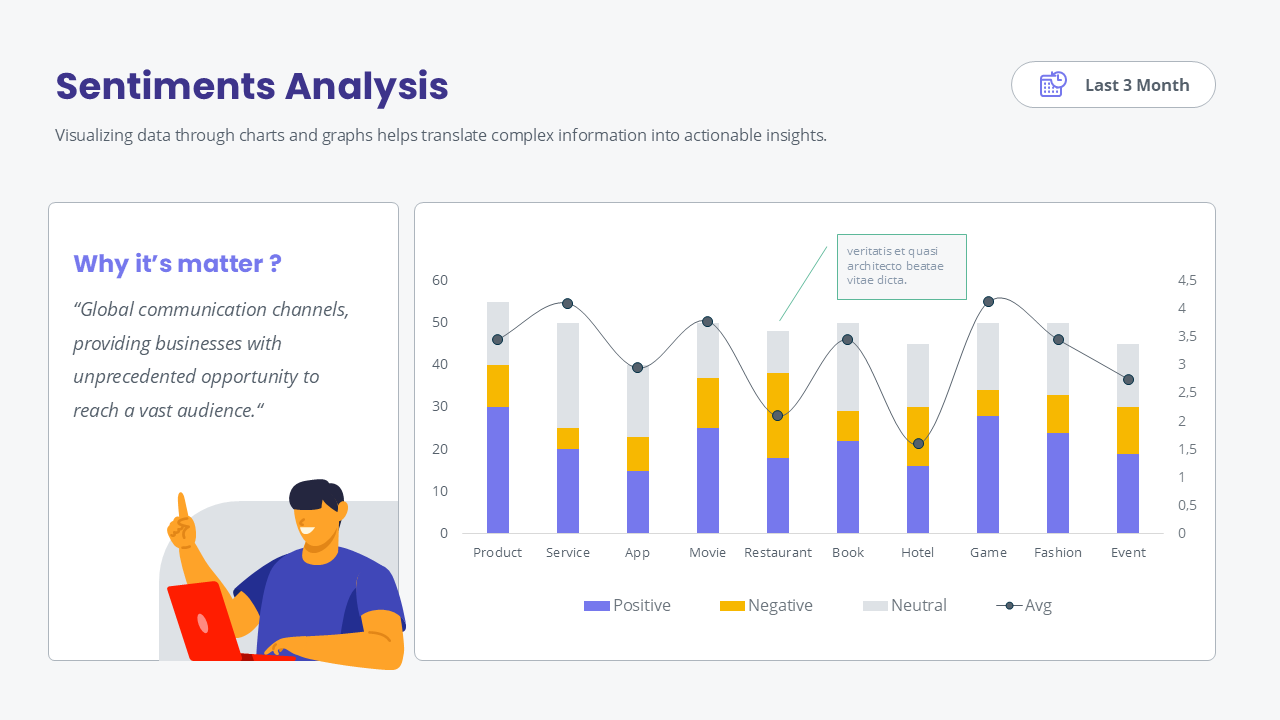
Instead of simply listing numbers, the presentation can organize information into charts, KPI cards, tables, and visual comparisons. This makes complex data easier to scan without overwhelming the audience.
For example, an analytics section could show:
- Audience growth over time
- Engagement rate trends
- Reach and impressions
- Best-performing content
- Content format performance
- Audience demographics
The key is to avoid filling every slide with charts. The purpose of visualizing analytics is to make the important patterns easier to identify, not simply to display more data.
3. Social Media Marketing Report Template
A marketing report usually needs to go beyond individual social media metrics.
For example, a marketing team may want to explain how a campaign contributed to awareness, engagement, traffic, leads, or another business objective. In this case, the report needs a structure that connects social media activity with the broader marketing strategy.
A typical presentation might include:
- Marketing objectives
- Campaign overview
- Social media performance
- Content highlights
- Audience response
- Campaign results
- Key findings
- Next-step recommendations
This structure is particularly useful when social media is only one part of a larger marketing campaign.
4. Social Media Agency Client Report Template
Agencies often have a different reporting requirement because the presentation needs to communicate results to someone who may not work with social media data every day.
A client-facing report should therefore prioritize clarity. Important results should be easy to find, while technical details can be presented in supporting slides.
A practical agency report can start with an executive summary, followed by performance highlights, content results, campaign analysis, and recommendations.
Using a consistent PowerPoint template also helps agencies maintain a recognizable presentation style across different clients while reducing the time required to prepare recurring reports.
5. Executive Social Media Report Template
Executives usually do not need every individual metric. They often need a concise overview of what changed, what performed well, what needs attention, and what should happen next.
An executive-focused social media report should therefore emphasize a small number of meaningful KPIs and supporting insights.
A simple structure could include:
- Overall performance summary
- Key KPI changes
- Top-performing content
- Important audience or campaign trends
- Key challenges
- Recommended next actions
This approach keeps the presentation focused on decisions rather than turning the report into a collection of raw analytics.
How to Choose the Right Social Media Report Template
When comparing templates, look beyond the visual design. A template may look attractive but still be difficult to use if its layouts do not match the type of information you need to present.
Consider the Reporting Frequency
If you create reports every month or quarter, choose a template that can be reused easily. Consistent slide structures make it easier for the audience to compare performance from one reporting period to another.
Consider Your Audience
A report for a social media specialist can contain more detailed analytics. A report for a client or executive audience may need simpler charts, clearer summaries, and more emphasis on insights.
Check the Chart and Data Layouts
Social media reports often contain numbers, so the template should provide enough layouts for charts, KPI summaries, comparisons, and tables.
Having multiple layout options is useful because not every metric should be displayed in the same format.
Look for Editable PowerPoint Elements
Make sure the template is designed for practical editing. Text, charts, shapes, colors, and other visual elements should be easy to customize so the presentation can adapt to different reporting requirements.
Prioritize Readability
A professional report does not need to be visually complicated. Clear typography, good spacing, consistent alignment, and a logical information hierarchy are often more valuable than decorative elements.
Why Use a PowerPoint Template for Social Media Reporting?
Creating every report from a blank PowerPoint file can take considerable time, especially when the same type of report needs to be produced repeatedly.
A reusable template provides a starting structure for the presentation. The marketing team can focus more on analyzing the results and developing recommendations instead of spending time rebuilding slide layouts.
A template can also help maintain consistency across reporting periods. When the structure stays familiar, stakeholders can compare reports more easily and quickly find the information they need.
Make Social Media Reports Easier to Present
The goal of social media reporting is not simply to show how many likes, followers, or impressions an account generated. The report should help the audience understand what those numbers mean.
A strong presentation connects data, insights, and actions.
That means a useful report might show that engagement increased, identify which content contributed to the change, explain the relevant audience response, and then suggest what the marketing team should test or improve in the next reporting period.
A PowerPoint template can provide the visual structure for that story while allowing the actual analysis to remain the focus.
Explore Professional Report PowerPoint Templates
If you are looking for a reusable template for social media reporting, marketing presentations, analytics, and performance reviews, explore the Appiqa Report PowerPoint Templates.
The collection is designed for professional reporting presentations and can be adapted for different types of marketing and business reports.
Whether you are preparing a monthly social media report, an agency presentation, or a broader marketing performance review, choosing a flexible PowerPoint structure can make the reporting process more efficient while keeping the final presentation professional and easy to understand.
Final Thoughts
The right social media report template should do more than make a presentation look polished. It should help organize information, highlight important performance changes, and communicate insights clearly.
Before choosing a template, consider your reporting frequency, audience, data requirements, and presentation goals. Once those requirements are clear, finding a suitable PowerPoint template becomes much easier.
For marketers and agencies that regularly create performance reports, a reusable template can also save preparation time and create a more consistent reporting workflow.